


Cloud Classroom
FAQs
How much experience of working online do I need?
Having experience online will make for a much smoother experience. In general, if you are comfortable with cloud-based products and use online platforms regularly, it should be fine. Experience of whiteboarding tools would be an advantage but we can teach you this through our pre-course work and videos. You should be comfortable switching between tabs and used to downloading videos and content from the internet. If unsure, do contact us.
How fast does my internet need to be?
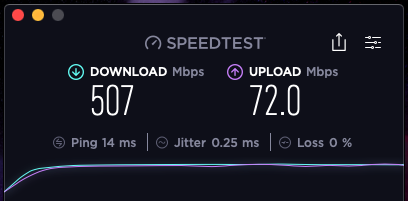
We require a minimum of 15Mbps download speed. This can be checked on www.speedtest.net or just search for a speed test online. Any slower than this and the videos and content will not work properly, and it will likely slow the other delegates down. We understand that internet speeds can go up and down a little, but as a rule of thumb 15Mbps is the minimum requirement. This ensures everyone on the course has an optimum experience.
Why do we have to do pre-course work?
We want to make the teaching experience as smooth as possible for all the delegates attending. Everyone has differing abilities online. We want to spend most of the time on the course learning the TOP-SET process and investigation techniques, not problem solving and teaching technology. We are an Investigation company not a technology company. By completing the pre-course work in advance, it means that every delegate has practised with the key tools we intend to use. This ensures the optimum experience for you and the other delegates on your course.
What do I do if I can’t log in?
Firstly, go back to your original joining email and follow the steps provided, step by step. We have provided a video and written instructions. The video is designed so you can play and pause sections while you complete the setup. If you are still having issues, speak with your own technical team in the first instance. If problems continue, please contact our team on info@kelvintopset.com. Please note we are open UK hrs Monday-Friday 9-5pm. It is important that you try and follow your instructions well in advance of your course so that we have the best possible chance of assisting you. If you contact us just prior to starting the course, it may be too late to solve your issues.
My videos are not showing properly.
Double check your internet speed on www.speedtest.net. You will require a minimum of 15Mbps download speed to complete the course. If you are not meeting this requirement, then it is likely that the content and videos will not show properly. This not only impacts your experience but also the experience of other delegates. Contact our office and we will see if we can find an alternative solution.
Why do I have to use your TOP-SET Cloud Classroom login account?
We create temporary accounts for everyone so that you can access the three key platforms we use to run the course efficiently. This means we have control over any technological issues you may experience. Your DATA is safe, and we follow all UK legislation on data protection. Our account means we can assist you and avoid any issues with your own personal accounts. The temporary accounts are deleted after each course.
Do I get course materials?
Certain key materials are available digitally for you to download. If you would like to order paper-based materials, these can be ordered by contacting our office. N.B. You do not need any paper-based materials to complete the course. It is designed to be run entirely online and there is no need for physical materials. It is a cloud-based course so uses cloud-based materials. This also helps the environment 
What time does my course start?
Your course start times are provided on your initial joining instructions. These may vary depending on what time zone you are in. Generally, all our open courses start at 0830 UK time. Our tutors are typically online and open the link 30-45 mins in advance. All our courses start on time and if you are late to join the class, you may be excluded to ensure that other delegates have an optimum experience.
What happens if I do not manage to complete pre-course work?
The pre-course work is mandatory so that your experience and the experience of other delegates is optimised. We want to spend the course teaching TOP-SET not technology, so we try to get everyone up to speed on the digital platforms prior to the course starting. If you do not complete the course work in advance, and do not contact us well in advance if required, you will be removed from the course to ensure that the other delegates all have a good experience. The pre-course work takes approximately 25 minutes to complete if you are proficient online.
Do I need two screens?
No. The course can be run on one screen from a laptop or a desktop computer. If you have two screens and have experience of using them, then you can run the course on two screens.
Can I work on an iPad or tablet?
No. The course is designed to operate on a laptop or desktop computer for the optimum user experience.
Can I run the course on a phone?
No. The course is designed to operate on a laptop or desktop compute; a phone is too small to interact with the course and complete the exercises and case studies.
I have no camera. Can I still join the course?
No. This course is not just a webinar as it involves a huge amount of interaction between you, your tutor and other delegates. We therefore require all delegates to have a camera, and keep it switched on throughout. Investigation requires lots of interaction and this is even more vital in the cloud environment. All our courses have multiple group exercises, scenarios and case studies that rely on a camera and clear audio connection.
Do I need a microphone and headset?
Yes, an external microphone and headset (rather than your built-in microphone) make for much clearer audio, especially if there is background noise in your work or home-office environment. Make sure you test this prior to the course.
My company has a firewall that will not allow certain sites. What can I do about this?
Firstly, speak with your office technical team. Many companies we work with remove temporary blocks if they are informed about the programs we are using in advance. Failing this, it can be possible to connect through web-based connections rather than apps. If your technical team cannot assist, please contact us well in advance of the course so we can do our best to assist.
How do I test my sound?
Zoom has a built-in sound test. If you open Zoom, click on Audio Settings. You can then test your microphone and speaker until you are happy with the quality. It is important that you test the microphone and headset you intend to use for the course. N.B. You should do this at least 48hrs prior to the course to solve any potential issues.
Can we use another platform instead of Zoom?
No. All our courses are designed to work through Zoom because it offers the best functionality for the exercises we run.
Can we connect to audio by phone?
No. Phone connections often create a delay and do not offer as good sound quality. It is best to connect through your computer audio and video settings. This will give you the best user experience.
Will a 3G, 4G or 5G connection work?
In some cases, it will. Typically, 3G is not fast enough, but 4G and 5G may work though will require a speed test and to meet a minimum of 15 Mbps. It must be tested well in advance.
What operating system do I need?
You will be able to use Windows or Mac. Zoom is available for both platforms and also has a browser based offering. We recommend Google Chrome as the browser required to join the course and this is available for Windows and Mac.
Will I learn as much as on a face-to-face course?
Obviously, face-to-face courses offer huge advantages. However, all our cloud courses have been designed to offer the best possible learning outcomes available in the cloud environment. We run the same multiple-choice assessments on our cloud courses and results have been consistent with the great results we get on our face-to-face courses. We have designed our platform so that it is not just a boring webinar that you watch. It is intended to be interactive, where small groups work together, offering multiple opportunities to interact and work with your tutor and delegates. Our tutor team are the same experienced tutor team that run our face-to-face courses globally. We also work on a much smaller tutor to delegate ratio.
What is the best internet browser to use?
Google Chrome is the preferred browser as we run the course through several Google-compatible apps.
Who do I contact if I can’t get into the cloud?
First, check your joining instructions and video again, then check with your own technical team if you need more help. If you are still experiencing issues, contact
Info@kelvintopset.com or +44 (0) 1475 560 007. Opening hrs Monday-Friday 9-5 UK Hrs
Do I need to test my settings in advance?
This is always a good idea. Shutting down your computer and restarting an hour before the course will help ensure your computer does not run an automatic update during the course.
I’m not very good with technology. Will I be OK?
It is best if you have a basic command of online skills. Proficiency in using the internet, and perhaps using web-based applications, will be of huge advantage. The pre-course work should also give you a good insight into how proficient your skills are. This will give you the best possible user experience.
Is there a video of pre-joining instructions?
Yes, each course has written, animated and a recorded video of joining instructions. They are provided in your joining instructions and can be found here. The video is designed to be paused, re-watched and run at your own pace so you can follow the instructions step by step.
Do I need to check for updates on my computer before the course?
This is always a good idea. Shutting down your computer and restarting an hour before the course will help ensure your computer does not run an automatic update during the course.
We have regular power cuts. Will this be an issue?
This could cause issues with the internet and connectivity. If you have a backup in place, make sure you have it tested to try and avoid disruption to the course. Please inform your tutor if you think this is a possibility.
I’m only running at a speed of 6Mbs. Will this be an issue?
Yes, we require a speed of 15Mbps. If you are close to this speed, it may be manageable, but any less than 10Mbps and it will not be possible to run the course.
Can I work with my colleague in the same room?
This is possible, but not ideal. If there is no other option, then you must each have your own computer, your own headset and microphone, and have tested your own audio settings in advance. Being in the same room can cause sound feedback and speed issues. It is important that you both test running videos at the same time as it is likely you will share your internet bandwidth.
What time zones do you operate in?
We try our best to accommodate private in-company courses in a range of time zones. Most of our tutors are based in Europe or New Zealand. Our open courses all run on UK hours.
What if we are all sharing an office router for internet?
You must test your speeds and make sure it has enough bandwidth to cope with you all working from the same router. If in doubt, please check with your I.T. team.
Do I need any special materials?
Having a pen and paper to hand is beneficial. You may wish to download and print our workbooks from the cloud classroom in advance if you prefer working with printed documents. Instructions on how to do this are provided in the joining video.
Webcam tips: How to look and sound great online
This link will give you some useful tips to get the best from your webcam and sound.